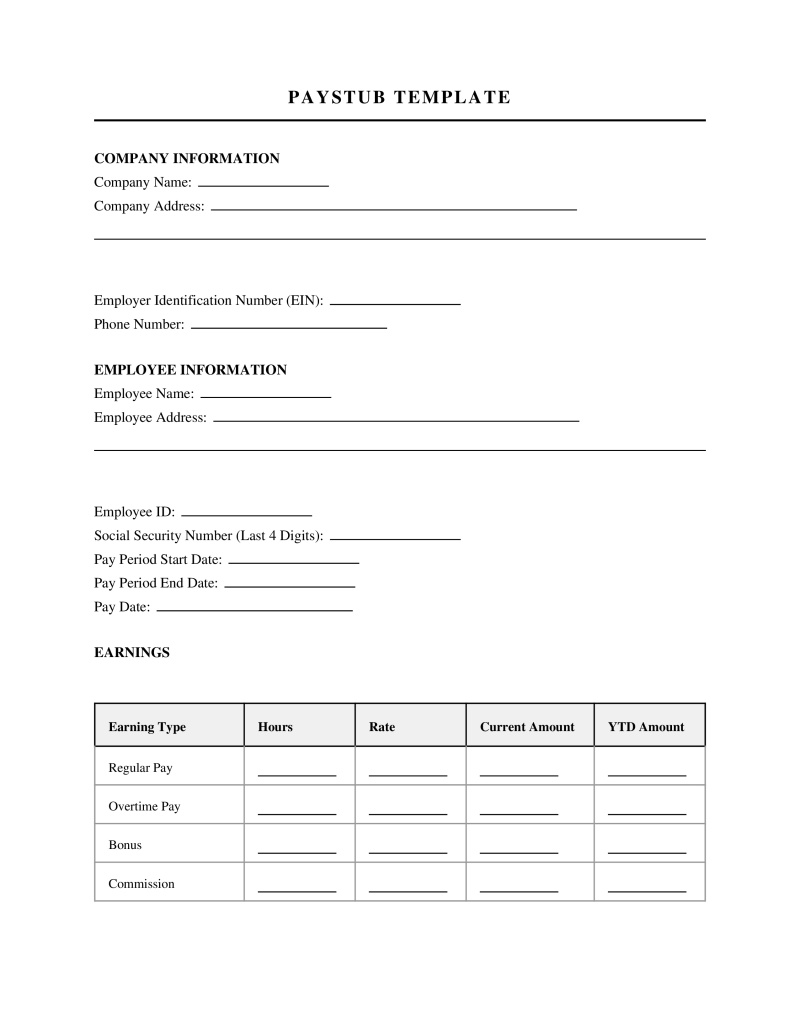
Paystub Template
A Paystub Template is a standardized document format used to generate an employee's pay statement, detailing gross wages, deductions, and net pay.
Pay Frequency
Select how often the employee is paid. This affects calculations for year-to-date and period earnings.
Enter a custom pay frequency if not listed above.
Table of Contents
What is a Paystub Template?
A paystub template is a pre-formatted document used by employers to generate itemized records of an employee's compensation for a specific pay period. These templates outline gross wages, tax withholdings, voluntary deductions, and net pay, providing a clear breakdown of how final take-home earnings are calculated. Business owners, human resource departments, and independent contractors utilize these structured layouts to maintain accurate financial records and ensure transparency in payroll administration.
Types of Paystub Templates
Employers select different layouts depending on the classification of the worker and the complexity of the payroll system:
- Hourly Employee Paystub - Designed for workers paid by the hour, featuring dedicated fields for regular hours, overtime hours, hourly rates, and shift differentials.
- Salaried Employee Paystub - Structured for workers with a fixed annual salary, displaying a consistent base pay amount per pay period without tracking hourly increments.
- Independent Contractor Paystub - Used by self-employed individuals or freelancers to document gross earnings, typically omitting tax withholdings and voluntary benefit deductions.
- Comprehensive Corporate Paystub - Features detailed sections for complex payroll setups, including retirement contributions, health insurance premiums, stock options, and multiple tax jurisdictions.
Core Elements of a Paystub Template
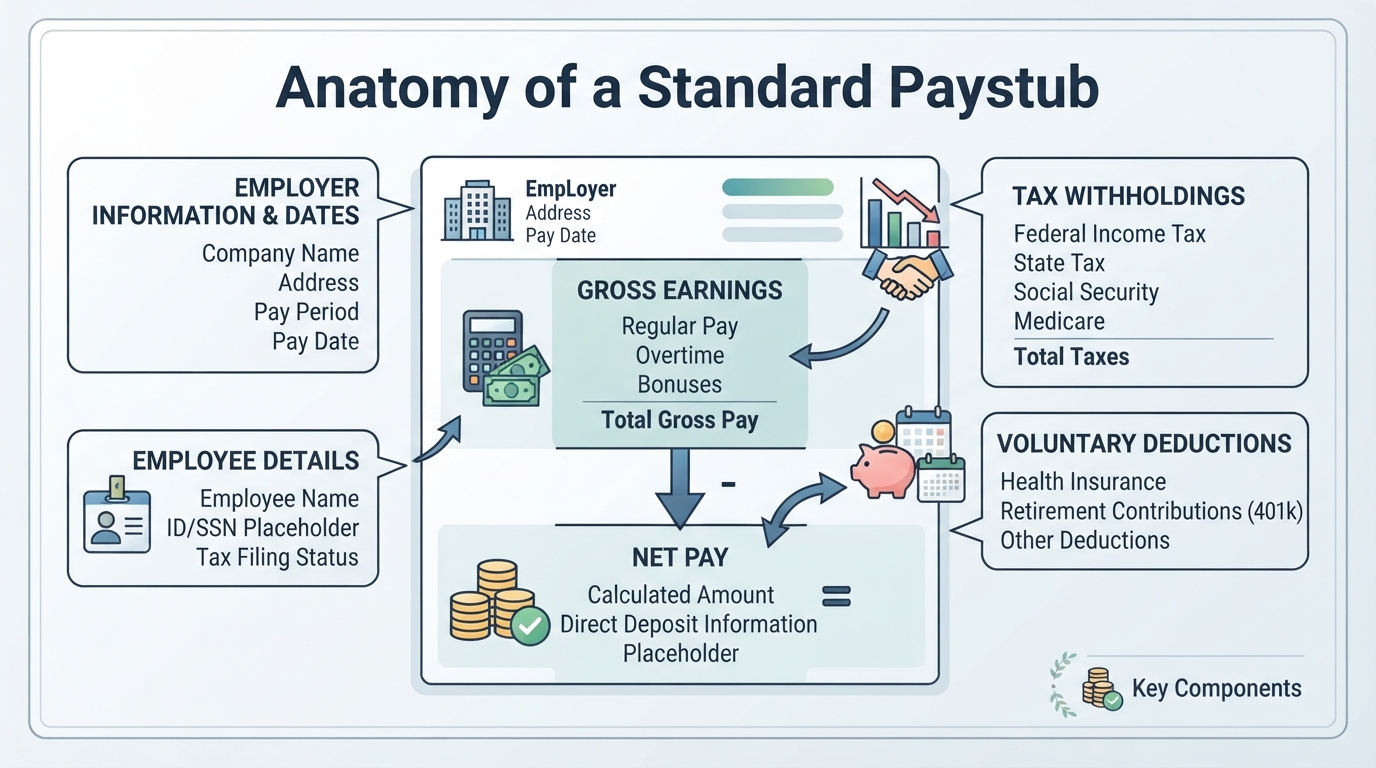
A standard payroll document must contain specific fields to provide a complete financial overview of the pay period:
- Employer Information - Includes the legal name, physical address, and federal employer identification number of the business.
- Employee Information - Displays the employee's full name, address, social security number, and employee identification number.
- Pay Period Dates - Identifies the specific start and end dates of the work period being compensated, along with the actual payment date.
- Gross Earnings - Details all income earned before any deductions, including regular wages, overtime, bonuses, commissions, and holiday pay.
- Tax Withholdings - Lists mandatory government deductions, including federal income tax, state income tax, local taxes, and Federal Insurance Contributions Act contributions.
- Voluntary Deductions - Outlines employee-authorized deductions, such as health insurance premiums, retirement savings contributions, and union dues.
- Net Pay - Shows the final take-home amount distributed to the employee after all mandatory and voluntary deductions are subtracted from gross earnings.
Legal Requirements and Federal Regulations
While federal law establishes certain baseline standards for employee compensation, specific documentation rules exist across different levels of government:
- Federal Minimum Wage Requirements - Employers must pay covered nonexempt employees at least the federal minimum wage of $7.25 per hour for all hours worked (29 U.S.C. § 206).
- Fair Labor Standards Act Recordkeeping - Requires employers to maintain accurate records of hours worked and wages paid, though it does not mandate the physical distribution of paystubs at the federal level (29 U.S.C. § 211).
- State-Mandated Paystub Delivery - Many states require employers to provide physical or electronic pay stubs detailing earnings and deductions for each pay period (varies by state statute).
- Access and Inspection Laws - Certain jurisdictions grant employees the legal right to inspect or receive copies of their payroll records within a specified timeframe (varies by state statute).
Practical Applications and Recordkeeping
Maintaining structured payroll documents serves several critical functions for both businesses and workers:
- Tax Preparation - Simplifies the year-end reconciliation process when filing federal, state, and local income tax returns.
- Proof of Income - Serves as official financial documentation for employees applying for mortgages, auto loans, apartment leases, or government assistance programs.
- Dispute Resolution - Provides a clear, verifiable audit trail to resolve discrepancies regarding hours worked, overtime calculations, or incorrect deductions.
- Business Expense Tracking - Helps employers monitor labor costs, analyze payroll budgets, and present accurate financial statements during corporate audits.
Common Errors in Payroll Documentation
Inaccurate payroll records can lead to compliance issues, financial penalties, and strained employee relations:
- Misclassification of Workers - Labeling employees as independent contractors to avoid tax withholdings, which violates state and federal labor guidelines.
- Incorrect Tax Calculations - Failing to update tax withholding tables or applying incorrect local tax rates based on the employee's residence.
- Omission of Year-to-Date Totals - Excluding cumulative earnings and tax deductions, which makes it difficult for employees to track annual tax liabilities.
- Improper Handling of Overtime - Failing to calculate overtime pay at the required rate of one and a half times the regular rate of pay for hours worked over forty in a workweek.
Frequently Asked Questions
Sources
- Minimum wage | U.S. Department of Labor - Provides information on federal minimum wage requirements, which are often detailed on pay stubs.
Not the form you're looking for?
Try our legal document generator to create a custom document
Disclaimer: The templates available on this website are provided for general informational purposes only and do not constitute legal advice. They are not intended to be, and should not be interpreted as, compliant with any specific legal, regulatory, or privacy requirements. These templates are not a replacement for professional legal guidance and should not be relied upon for any particular matter or circumstance. Users are strongly encouraged to seek advice from a qualified attorney licensed in their jurisdiction before using, modifying, or relying on any template.
All templates are provided on an "as is," "with all faults," and "as available" basis. The provider disclaims any and all warranties of any kind, whether express, implied, statutory, or otherwise, including without limitation warranties of merchantability, fitness for a particular purpose, title, or non-infringement.
LegalTemplates.com makes no guarantees or representations regarding the accuracy, completeness, expected outcomes, or reliability of the materials contained in these templates or any materials referenced or linked from them.