Time Off Request Form
A Time Off Request Form is used by employees to formally request leave from work, detailing dates and reasons for absence to management.
Leave Type
Select the primary category for your time off request.
Provide details if your leave type is not listed.
Table of Contents
What Is a Time Off Request Form Template?
A Time Off Request Form Template serves as a standardized document that employees use to formally request leave from work. This essential tool streamlines the process of communicating desired time away, whether for vacation, personal appointments, sick days, or other approved absences. For teams and organizations, it provides a consistent, transparent, and auditable method for managing employee availability, ensuring adequate staffing, and maintaining clear records of all leave requests and approvals.
What Is Included
A robust time off request form includes several key sections to ensure all necessary information is captured and processed efficiently. These components are designed to facilitate clear communication between employees, managers, and HR, preventing misunderstandings and ensuring smooth operations.
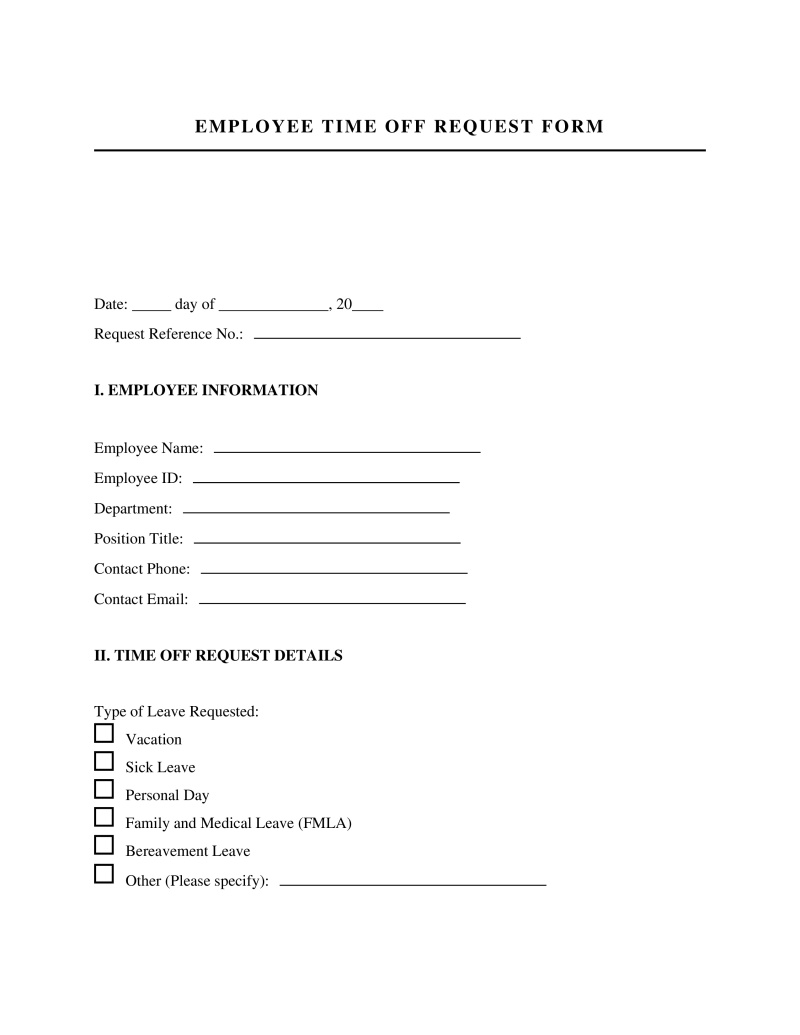
- Employee Information - This section is crucial for identifying the individual making the request, typically including their full name, employee ID, department, and contact details. It ensures that the request is properly attributed and routed.
- Request Details (Dates and Type of Leave) - Employees specify the exact start and end dates of their requested time off, including whether it's full days or partial days. They also indicate the type of leave being requested, such as vacation, sick leave, personal day, or unpaid leave, which helps in applying the correct company policies and tracking.
- Reason for Leave (Optional) - While not always mandatory, providing a brief reason can be helpful for resource planning, especially for longer or unusual requests. This section should respect employee privacy while offering context where appropriate.
- Manager Approval Section - This dedicated area allows the employee's direct manager or supervisor to officially approve or deny the request. It typically includes fields for the manager's name, signature, date of decision, and any specific notes or conditions related to the approval.
- Leave Balance Information - A critical component for both employees and management, this section outlines the employee's current accrued leave balances (e.g., vacation, sick leave) and the projected balance after the requested time off is taken. This transparency helps employees manage their time and managers make informed decisions.
- HR/Payroll Notes - This area is reserved for administrative use by Human Resources or Payroll departments. They might use it to record adjustments to leave balances, note specific policy applications, or prepare for payroll processing related to paid or unpaid leave.
- Employee Acknowledgment and Signature - By signing and dating this section, the employee confirms that all information provided is accurate and that they understand the company's time off policies. This creates a formal record of their submission.
- Submission Date - This simple but important field records when the request was originally submitted, which can be vital for adhering to notice period policies and resolving any timing-related disputes.
Who Should Use This Template?
Understanding when a time off request form template is most effective, and when it might not be the optimal solution, is key to efficient workforce management. Its utility varies significantly based on organizational size, existing infrastructure, and specific operational needs.
Best For
- Small to Medium-Sized Businesses (SMBs) - Companies that may not have complex HRIS (Human Resources Information Systems) can rely on these forms for a cost-effective and straightforward way to manage leave.
- Teams Transitioning to Digital Workflows - Organizations moving away from purely paper-based systems can use a digital form template (e.g., Google Docs, fillable PDF) as an accessible first step.
- Companies with Clear, Standardized Leave Policies - If your company's leave policies are well-defined and don't require intricate calculations or multi-stage approvals, a template provides sufficient structure.
- Ad-Hoc and Project-Based Teams - For groups needing a quick, unambiguous way to coordinate short-term absences without extensive administrative overhead.
- Organizations Needing a Simple Audit Trail - If the primary need is to have a clear, documented record of requests and approvals for compliance or internal review purposes.
Not Ideal For
- Large Enterprises with Complex HRIS - Organizations already utilizing integrated HR software with built-in time off management modules will find a standalone template redundant and less efficient.
- Companies with Highly Granular Leave Policies - If your leave policies involve intricate accrual rates, specific legal mandates (e.g., FMLA, state-specific parental leave), or complex rollover rules, a simple template may lack the necessary automation and tracking capabilities.
- Organizations Requiring Real-Time Leave Balance Updates - If employees and managers need immediate, always-current visibility into leave balances and projected availability across the entire workforce, a manual form system will fall short compared to dynamic software.
- High-Volume Request Environments - In settings where hundreds of time off requests are processed weekly, manual handling of forms can become a significant administrative burden and bottleneck.
- Teams Needing Extensive Cross-Departmental Coordination - For projects or departments that rely heavily on real-time availability and require complex approval workflows spanning multiple managers or departments, a more integrated system is typically superior.
Quick Start Guide
Implementing a time off request form template effectively requires a clear process to ensure smooth adoption and consistent application. Follow these tactical steps to get started:
- Select and Customize Your Template - Choose a template that best fits your company's size and leave policies. Customize fields like department names, leave types, and approval routing instructions to align with your specific organizational structure and terminology. Ensure it includes all necessary sections for employee and manager input.
- Define and Communicate Your Time Off Policy - Before distributing the form, ensure your company's time off policy is clearly documented, accessible to all employees, and covers aspects like notice periods, maximum leave durations, and approval criteria. The form acts as an instrument of this policy.
- Establish a Clear Submission Process - Determine how employees will submit the completed form. Will it be emailed to their manager, uploaded to a shared drive, or physically handed in? Communicate this process explicitly to avoid confusion and ensure requests reach the right approver promptly.
- Implement an Approval Workflow - Outline the steps for manager review and approval. This includes how managers access submitted forms, the criteria they use for approval (e.g., staffing levels, project deadlines, leave balances), and how they communicate their decision back to the employee. Consider a secondary approval for certain types of leave, if applicable.
- Set Up a Centralized Record-Keeping System - Decide where approved (and denied) forms will be stored. This could be a digital folder on a shared drive, an HR portal, or a physical binder. Consistent record-keeping is vital for payroll, compliance, and resolving future disputes.
- Integrate with Scheduling and Calendar Tools - Encourage managers to update team calendars or project schedules once time off is approved. This proactive step helps prevent scheduling conflicts and ensures team awareness of colleagues' absences, maintaining operational continuity.
- Regularly Review and Update the Template and Process - Periodically assess the effectiveness of your time off request form and the associated process. Gather feedback from employees and managers. Update the template or refine the workflow as company policies evolve or as you identify opportunities for improvement.
Frequently Asked Questions
Time Off Request Form Sample
Not the form you're looking for?
Try our legal document generator to create a custom document
Disclaimer: The templates available on this website are provided for general informational purposes only and do not constitute legal advice. They are not intended to be, and should not be interpreted as, compliant with any specific legal, regulatory, or privacy requirements. These templates are not a replacement for professional legal guidance and should not be relied upon for any particular matter or circumstance. Users are strongly encouraged to seek advice from a qualified attorney licensed in their jurisdiction before using, modifying, or relying on any template.
All templates are provided on an "as is," "with all faults," and "as available" basis. The provider disclaims any and all warranties of any kind, whether express, implied, statutory, or otherwise, including without limitation warranties of merchantability, fitness for a particular purpose, title, or non-infringement.
LegalTemplates.com makes no guarantees or representations regarding the accuracy, completeness, expected outcomes, or reliability of the materials contained in these templates or any materials referenced or linked from them.