Direct Deposit Form
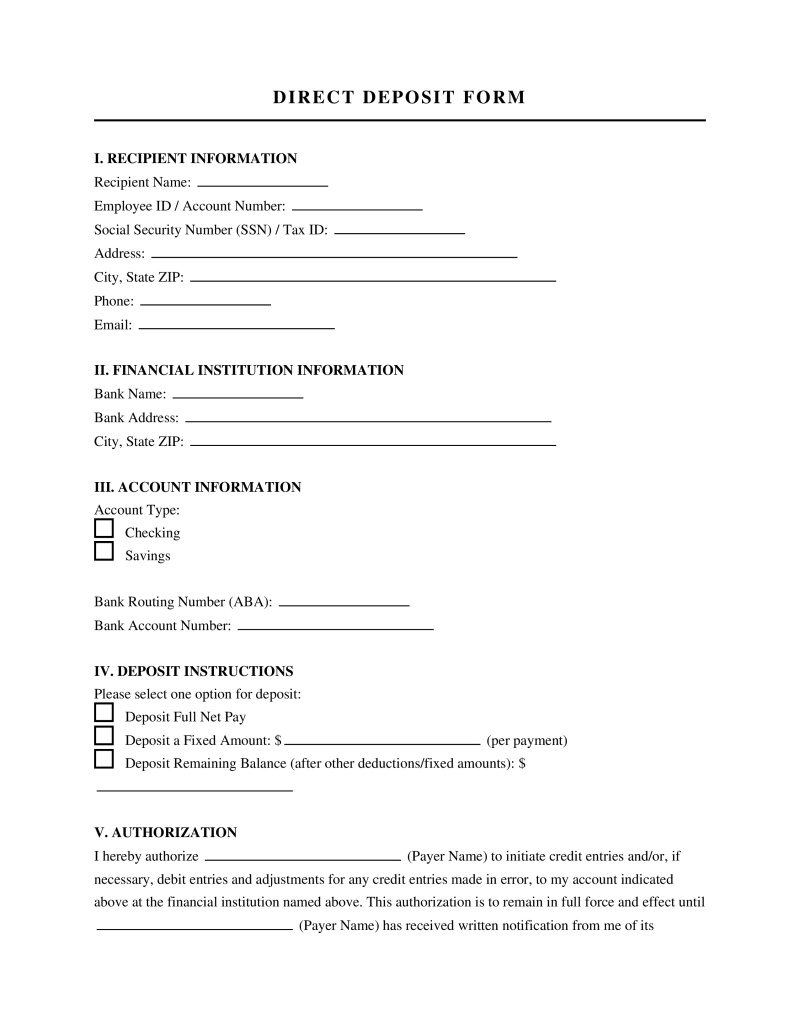
A direct deposit form is a document that authorizes an organization to electronically transfer funds directly into an individual's bank account.
Payment Type
Select all payment types that apply. This helps ensure the correct authorization for each deposit type.
Provide details for any payment type not listed above.
Table of Contents
What Is a Direct Deposit Form Template?
A Direct Deposit Form template is a standardized document that employees use to authorize their employer to electronically transfer their wages directly into their bank account(s). This template streamlines the payroll process for businesses, eliminating the need for physical checks and reducing administrative overhead. For employees, it offers a secure, convenient, and often faster way to receive their pay, ensuring funds are available promptly without a trip to the bank. Teams leverage this template to maintain consistency, ensure all necessary banking information is captured accurately, and comply with internal payroll procedures.
What Is Included
A comprehensive Direct Deposit Form template is designed to capture all essential information required for secure and accurate electronic fund transfers. Understanding each component ensures both employers and employees complete the form effectively, avoiding common payroll errors.
- Employee Information - This section gathers basic details about the employee, such as their full name, employee ID, and contact information. It is crucial for identifying the individual whose pay is being directed, ensuring the funds are linked to the correct payroll record.
- Employer Information - While sometimes pre-filled, this section includes the company's name and sometimes its address or employer identification number (EIN). This helps clarify which employer is initiating the direct deposit, especially useful for employees working multiple jobs or for third-party payroll providers.
- Bank Information - This is the core of the Direct Deposit Form, requiring the employee's bank name, routing number, and account number. The routing number identifies the financial institution, while the account number specifies the individual account. Accuracy here is paramount to prevent misdirection of funds.
- Account Type Designation - Employees specify whether the account provided is a checking or savings account. This distinction is important for banking systems to correctly process the transaction, as different account types may have varying processing rules or fees.
- Deposit Allocation (Optional) - For employees wishing to split their pay across multiple accounts or different financial institutions, this section allows them to specify a fixed amount or percentage for each account. This flexibility is a key benefit of direct deposit, but requires precise allocation instructions.
- Voided Check or Bank Statement Requirement - Many forms request a voided check or a letter from the bank to verify the provided account and routing numbers. This acts as a critical safeguard against errors, as it visually confirms the banking details directly from a source document.
- Authorization and Signature - This section includes a statement where the employee authorizes the employer to initiate direct deposits and acknowledges their understanding of the terms. The employee's signature and date legally validate the request, making it official.
- Date of Effect - This field specifies when the direct deposit should begin. It helps payroll departments plan accordingly, especially if an employee is transitioning from paper checks or updating their banking information, ensuring a smooth changeover.
Who Should Use This Template?
The Direct Deposit Form template is a versatile tool, but its utility shines brightest in specific organizational contexts and workflows. Understanding its ideal applications, as well as scenarios where it might not be the most efficient solution, helps teams make informed decisions about their payroll processes.
Best For
- Small to Medium-Sized Businesses (SMBs) - Companies with growing workforces that are transitioning from manual payroll methods to more automated systems will find this template invaluable for standardizing employee banking information collection.
- Organizations with High Employee Turnover - Businesses in sectors like retail, hospitality, or seasonal work often onboard new staff frequently. A clear, consistent Direct Deposit Form ensures quick and error-free setup for new hires' pay.
- Companies Using Third-Party Payroll Services - Even when outsourcing payroll, a standardized form ensures that all necessary data is collected internally before being submitted to the payroll provider, reducing back-and-forth communication and potential delays.
- Remote or Distributed Teams - For companies with employees spread across different locations, direct deposit is essential for timely payments, and a template ensures consistent data capture regardless of where the employee is located.
- Teams Aiming for Paperless Operations - Organizations committed to reducing paper waste and streamlining administrative tasks will benefit from using digital versions of this template for efficient record-keeping and processing.
Not Ideal For
- Very Small Businesses (e.g., 1-2 Employees) with Manual Payroll - For micro-businesses still issuing paper checks and managing payroll manually, the overhead of setting up direct deposit for just a couple of employees might outweigh the benefits, though it's still a good long-term goal.
- Highly Specialized or Custom Payroll Systems - Companies with bespoke, deeply integrated payroll software might prefer to onboard banking details directly through their system's interface, which may already have built-in data capture.
- Organizations with Strict Regulatory Compliance on Data Input - In highly regulated environments where banking details must be entered and verified by specific, certified personnel through secure, proprietary systems, a general template might not meet stringent input protocols.
- Teams with Extremely Low Digital Literacy - While rare, if a significant portion of the workforce struggles with digital documents or online forms, a physical, hand-filled form might be more accessible, though less efficient.
Quick Start Guide
Implementing a Direct Deposit Form template effectively involves more than just filling it out. These tactical steps guide you through setting up and managing direct deposit for your team efficiently.
- Choose Your Template Format - Decide whether to use a digital (fillable PDF, Google Docs, Word document) or printable paper version. Digital forms offer easier storage and transmission, while physical forms might be preferred for in-person onboarding or for employees without easy digital access.
- Customize with Employer Branding and Specifics - Add your company logo, contact information, and any specific internal instructions (e.g., "Return to HR Department," "Employee ID required"). This makes the form professional and clear for your employees.
- Distribute the Form Securely - For new hires, include the Direct Deposit Form in their onboarding packet. For existing employees, make it easily accessible via your HR portal, company intranet, or during open enrollment periods. Emphasize secure submission methods.
- Educate Employees on Required Information - Provide clear instructions on where to find their bank routing and account numbers (e.g., on a voided check, bank statement, or through online banking). Explain the importance of accuracy to prevent payment delays.
- Implement a Verification Process - Upon receipt, cross-reference the banking details provided on the form with a voided check or bank letter if supplied. This critical step minimizes errors and potential fraud. For digital submissions, consider a two-step verification for sensitive data.
- Enter Data into Payroll System Promptly - Once verified, accurately input the employee's direct deposit information into your payroll software. Double-check all entries before saving and processing the next payroll cycle.
- Communicate Effective Date and First Direct Deposit - Inform the employee of the exact payroll date when their direct deposit will become active. Advise them to monitor their bank account on that date to confirm successful receipt of funds, especially for their initial direct deposit.
- Securely Store Completed Forms - Whether digital or physical, store completed Direct Deposit Forms in a secure, confidential location, accessible only to authorized personnel (e.g., HR, Payroll). This ensures compliance with data privacy regulations.
Frequently Asked Questions
Direct Deposit Form Authorization Sample
Not the form you're looking for?
Try our legal document generator to create a custom document
Disclaimer: The templates available on this website are provided for general informational purposes only and do not constitute legal advice. They are not intended to be, and should not be interpreted as, compliant with any specific legal, regulatory, or privacy requirements. These templates are not a replacement for professional legal guidance and should not be relied upon for any particular matter or circumstance. Users are strongly encouraged to seek advice from a qualified attorney licensed in their jurisdiction before using, modifying, or relying on any template.
All templates are provided on an "as is," "with all faults," and "as available" basis. The provider disclaims any and all warranties of any kind, whether express, implied, statutory, or otherwise, including without limitation warranties of merchantability, fitness for a particular purpose, title, or non-infringement.
LegalTemplates.com makes no guarantees or representations regarding the accuracy, completeness, expected outcomes, or reliability of the materials contained in these templates or any materials referenced or linked from them.